


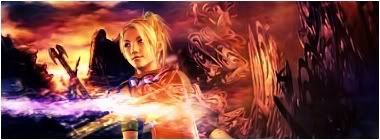
this one is much betteryou picked a nice stock, the border is WAAAY better than before, the detail on the clothes look great (although you accidentally painted over some of her hand
), AND the text looks alot better with an effect (in this case the outlines in different colors)
it's really a big improvement, or maybe not even that... the other one was probably just that you had a bad day or something... since you've made great sigs before...(like your current)
hmm to make this one better i'd suggest making it a liiiiiiiiittle bit smaller... because people generally don't like sigs that are big... (even if they are within restrictions), second maybe erase stuff that don't have anything with the sig to do, for example the powerline; this can probably be done by using a tool called the "Heal" tool (PS users can correct me if i'm wrong, i'm not exactly familiar with PS terms...)... anyway you should check that out... if the heal tool doesn't work you can try the clone tool, you just select a point of origin which will be "cloned" and then when you use the brush it will copy from the point of origin, so you can just select somewhere on the sky as a point of origin and clone over the powerline...

 Reply With Quote